Publishing Strategy · 11 min read
The Best Time to Post on YouTube: Build a Schedule From Real Audience Data
There is no universal best hour. Use Audience Analytics, competitor patterns, format, and a repeatable experiment to find the publishing schedule that fits your channel.
 AUDIENCE ANALYTICS / 03Publishing StrategyPOST NOW?TIMING MATTERS
Search for the best time to post on YouTube and you will find confident charts naming a particular weekday and hour. Those charts can be useful as a temporary starting point, but they cannot know where your viewers live, when they are available, whether they watch Shorts or long-form tutorials, or how quickly your videos earn clicks and watch time. The most useful publishing schedule is built from your audience data, your production capacity, and controlled testing—not a universal clock.
The best time is a window, not a magic minute
Publishing time can influence how quickly the right viewers encounter a new upload, especially when subscribers, community activity, live events, or external promotion create an early burst of attention. It does not rescue an unclear topic, weak title and thumbnail, or video that loses viewers in the opening. YouTube search and recommendations consider relevance, engagement, quality, and personalization. Timing helps distribution meet availability; it is not a substitute for viewer satisfaction.
Start with the Audience tab in YouTube Analytics
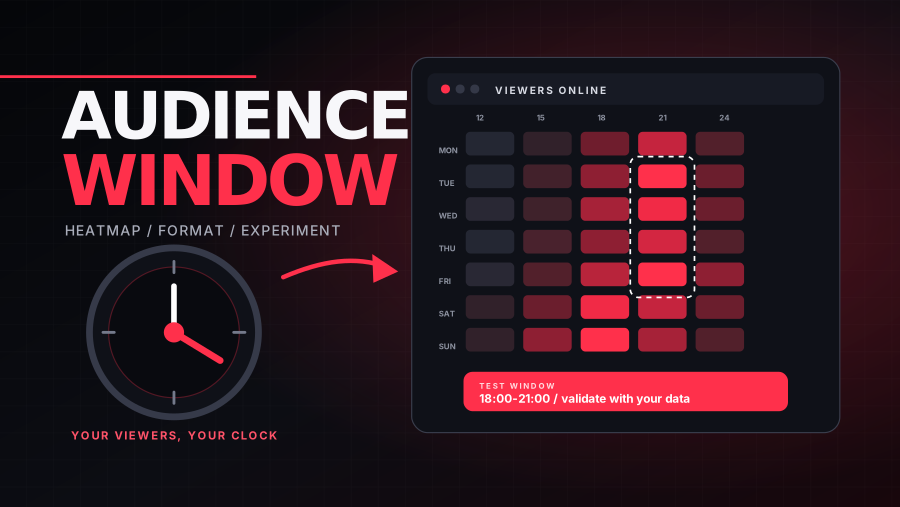
For channels with enough viewer data, YouTube Studio’s Audience tab includes a report called When your viewers are on YouTube. It shows when people who watch your channel were online across YouTube during the previous 28 days. YouTube specifically suggests using the report to understand when to schedule a Premiere or plan a live stream. It can also provide a practical publishing hypothesis for regular uploads, although being online does not guarantee that a viewer will choose your video.
Read the heatmap as a pattern rather than chasing the single darkest block. Look for repeated clusters across several days. Convert the display into your channel’s working timezone, then consider the top geographies report so your team understands which audience day the chart represents. If the audience is split across North America, Europe, and Asia, one time may never serve everyone equally. Choose the window that best matches your priority audience or rotate times deliberately.
Publish before the peak, then verify
A common test is to publish one to three hours before a recurring audience peak. That gives processing, notifications, homepage distribution, captions, and your own promotional workflow time to settle before more viewers become active. This is a hypothesis, not a platform rule. A news channel may need to publish immediately. A live stream should prioritize the time viewers can attend. An evergreen tutorial can earn most of its value through search and recommendations long after launch.
Schedule the upload in advance rather than manually pressing Publish at the target minute. Upload early enough for HD or 4K processing, rights checks, subtitles, end screens, cards, chapters, descriptions, and thumbnail review. A perfectly timed video that launches in low resolution or with a broken thumbnail is not a successful timing strategy.
What to do when your channel lacks audience data
New and small channels may not have enough data for every Audience report. Begin with evidence outside your own dashboard. Identify five to ten channels that serve a similar viewer—not merely channels in the same broad category. Record their recent public upload dates, days of week, approximate times, format, topic, and performance after a comparable number of days. You are looking for habits and opportunities, not proof that their schedule caused their results.
YT Insight’s Upload Schedule Analyzer can turn a public channel’s recent publishing history into a day-and-hour pattern, estimate cadence, and separate Shorts from longer videos. Use several comparable channels so one creator’s routine does not become a false rule. Also note their audience region and business model when known. A US-based live commentary channel and a global evergreen education channel may share a niche but require different schedules.
Cadence usually matters more than precision
A sustainable promise—such as one strong tutorial every Tuesday—is more useful than an aggressive timetable your team cannot maintain. Consistency helps viewers know what to expect and gives your production process a stable feedback loop. It does not mean every upload must occur at the exact same minute, nor does it guarantee algorithmic preference. Think of cadence as an operating system: research, scripting, production, thumbnail review, publishing, engagement, and analysis happen on a repeatable rhythm.
- Choose a minimum viable cadence your team can maintain for at least eight weeks.
- Batch production tasks that benefit from repetition, but leave room for timely topics.
- Separate the publishing schedule from the recording schedule so processing problems do not force late launches.
- Reserve a review checkpoint for title, thumbnail, opening hook, captions, chapters, and end-screen links.
- Create a fallback plan for missed deadlines instead of releasing a weaker video simply to protect a streak.
Different formats need different timing logic
Long-form search tutorials can be relatively time-independent because viewers discover them when a problem appears. Browse-led entertainment benefits more from subscriber availability and packaging momentum. Shorts are consumed in a continuous feed and may find viewers outside the initial publishing window, so rapid testing of concepts can matter more than a single hour. Premieres and live streams are appointments: viewer availability, reminders, and community communication are central. News, sports, and trend reactions lose value when delayed, making speed part of relevance.
Do not blend these formats into one performance average. A schedule that works for live streams may look poor for evergreen videos, and Shorts can create large view totals without predicting long-form behavior. YouTube’s Audience reports include the formats viewers watch, which can help a channel decide not only when to publish but what mix of videos, Shorts, and live content matches existing demand.
Run a four- to eight-week timing experiment
- Choose one repeatable format and topic range. Timing comparisons are weak when every video serves a different audience.
- Select two publishing windows based on your audience heatmap or competitor observations. Keep the days and timezones explicit.
- Alternate the windows across at least four comparable uploads while maintaining similar promotion and production quality.
- Record impressions, click-through rate, views, watch time, average view duration, returning viewers, and subscriber gain at consistent checkpoints such as 24 hours, 7 days, and 28 days.
- Review the title, thumbnail, topic demand, traffic source, and retention curve before assigning a performance difference to timing.
Use medians rather than letting one breakout video determine the result. Keep a simple experiment log with the hypothesis and any unusual event, such as a collaboration, holiday, trend spike, email campaign, or technical problem. If one window repeatedly improves early reach without reducing longer-term performance, make it the default. Retest quarterly or when audience geography, format mix, or upload frequency changes.
The first 24 hours: what your team can control
Before launch, confirm that the title and thumbnail make one coherent promise. Put the most important language near the beginning of the title without sacrificing clarity. Write a useful description, add chapters where appropriate, publish accurate captions, and connect the video to a relevant playlist or next video. These steps help viewers understand and navigate the content; they are not permission to stuff repetitive keywords.
After publishing, watch for technical problems and respond to substantive comments while the conversation is active. Promote the video to existing audiences only where it fits—newsletter, community post, website, or social channel—rather than generating low-intent clicks. Early traffic is valuable when those viewers genuinely want the content. A burst of people who leave immediately does not create a healthy launch.
How to diagnose a weak launch
- Low impressions with healthy click-through and retention can indicate limited initial distribution, a narrow topic, or a channel-audience mismatch. Give evergreen content time before making a conclusion.
- High impressions with low click-through points first to topic positioning, title, or thumbnail—not the upload hour.
- Strong click-through with an early retention collapse suggests that the opening or content did not deliver the packaging promise.
- Good viewer response but poor notification traffic may reflect subscriber inactivity or notification settings; it does not necessarily mean the publish window failed.
- A video that starts slowly but grows through search can still be a durable success. Evaluate the traffic source and the intended job of the video.
A practical weekly schedule template
For a channel publishing one researched video per week, a simple system might look like this: review audience and topic data on Monday, finalize the script on Tuesday, record on Wednesday, edit and prepare captions on Thursday, review title and thumbnail on Friday morning, and schedule the video for the selected audience window. After launch, document the first-day metrics and comments, then perform a deeper review after seven days. The specific weekdays do not matter; the separation of decisions does.
A two-format channel can add Shorts or clips on separate days without assuming they must promote every long-form upload. Use each format for a clear audience job. If production quality falls or the team stops learning from results, reduce frequency. The best schedule is the one that repeatedly produces useful videos and leaves enough time to study what happened.
Frequently asked questions
Should I publish exactly when the heatmap is darkest?
Not necessarily. Test a window before the peak and compare consistent checkpoints. The report shows when viewers are on YouTube, not a guaranteed click time for your upload.
Does changing upload time hurt the algorithm?
There is no need to protect a mythical exact minute. Change one variable deliberately, document the test, and judge viewer response over several comparable videos.
Is consistency more important than quality?
A sustainable cadence supports quality and learning; it should not force weak uploads. Viewer value and satisfaction remain more important than preserving a streak.
Timing is an optimization layer, not the foundation. Build a clear topic, compelling package, strong opening, and useful viewing experience first. Then use your own audience evidence to decide when that work has the best chance to meet the people it was made for.
YT Insight is independent and is not affiliated with YouTube or Google.